BT Broadband Cancellation Guide
BT Broadband Cancellation Online:Guide for UK Users
If you’re thinking of cancelling your BT Broadband, you’re not alone. Many UK users switch providers to take advantage of better deals, improved speeds, or superior customer service. Whether you’re moving house, upgrading to a faster plan, or simply not satisfied with the service, understanding the cancellation process is key to avoiding unnecessary charges and hassle.
Summary of Key Points
- Cancelling BT Broadband requires 30 days’ notice.
- You may need to pay an early termination fee if you’re still in contract.
- The BT broadband cancellation number is 0800 783 1401.
- Switching providers? Your new provider will handle the process.
- Compensation may be available if BT provides inaccurate switching information
In this guide, we’ll explain how to cancel BT Broadband online, how the early termination fee is calculated, and provide you with the official BT broadband cancellation number. We have also included additional advice such as modifying your package instead of cancelling, proper equipment return procedures, troubleshooting tips, and even negotiation strategies
How to Cancel BT Broadband Online
Cancelling your BT Broadband online is designed to be simple and user-friendly. Here’s a step-by-step guide:
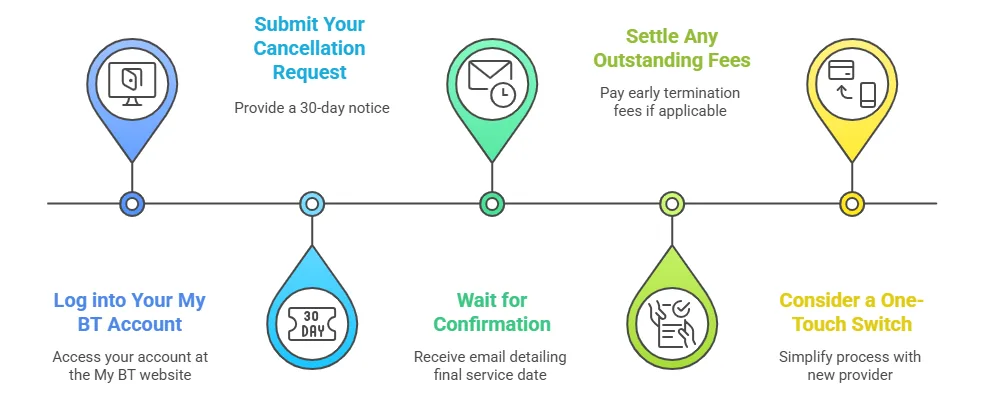
- Log into Your My BT Account: Access your account at the My BT website. This secure online portal gives you control over your services, including upgrades, plan modifications, and cancellations.
- Submit Your Cancellation Request: Within your My BT account, locate the cancellation option and follow the prompts. Remember, you must provide a 30-day notice before the service officially ends. For more on this policy, refer to BT Broadband Help.
- Wait for Confirmation: BT will email you a cancellation confirmation that details your final service date. Your broadband will continue to work for 30 days following your cancellation request while BT prepares your final bill.
- Settle Any Outstanding Fees: If you cancel before your minimum contract period expires, you’ll face an early termination fee (discussed in detail in the next section). Make sure your final bill covers any amounts due.
- Consider a One-Touch Switch: Many new providers in the UK offer a “One-Touch Switch” service, meaning they contact BT on your behalf—simplifying the process further.
If you’re considering cancelling BT Broadband, our broadband coverage checker is a valuable resource. It helps you compare current market offerings so that any decision you make—whether it’s cancellation, modification, or negotiating a better deal—is fully informed by the latest broadband options available in your area.
BT Broadband Cancellation Number
If you prefer to cancel over the phone, you can contact BT at 0800 783 1401. Their customer service hours are:
- Monday to Friday: 8am – 9pm
- Saturday: 8am – 8pm
- Sunday: 9am – 6pm
Cancelling BT Broadband by Email
While many users cancel via the My BT account or by phone, you also have the option to cancel BT Broadband by email. Under contract law, you are allowed to serve notice via email. Some customers have successfully emailed Digital Resolution at digital-resolutionteam@bt.com to notify BT of their decision. When cancelling by email, keep the following tips in mind:
Save a Copy: Retain a copy of your sent email and any reply you receive as proof of the cancellation request.
Include Key Details: State your account number, full name, and preferred cancellation date. Mention that you are giving the required 30-day notice.
Follow Up: If you do not receive a confirmation within a few days, it is advisable to follow up by phone or check your My BT account.
Using email is a convenient alternative if you prefer a written record of your request.
BT Broadband Early Termination Fees
When cancelling your BT Broadband in the midst of your contract, you’ll often be liable for an early termination fee. Here’s what you need to know about it.
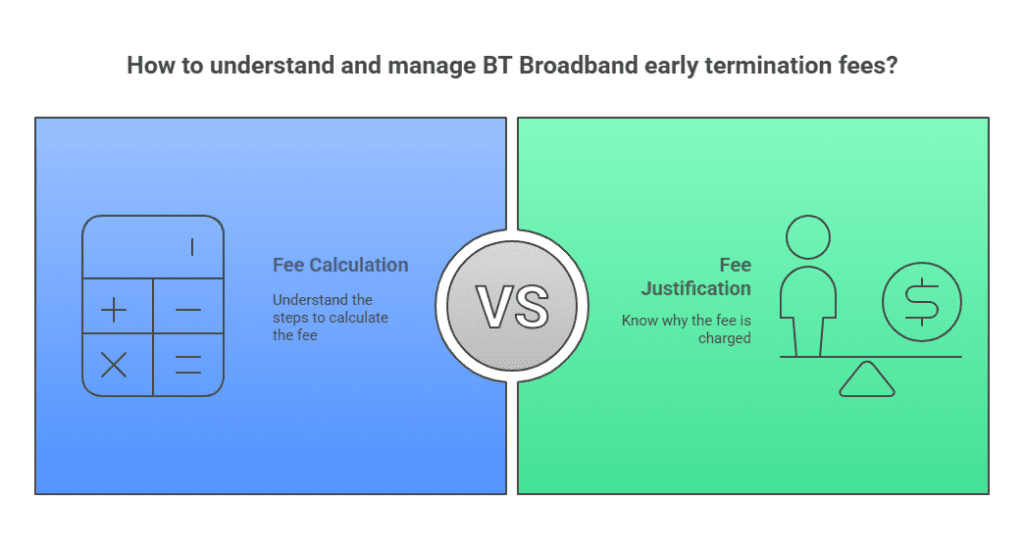
- Why the Fee Applies: BT charges the early termination fee to make up for the cost savings and service obligations that are affected when you cancel before the end of your contract. It recovers part of the revenue that was factored into your contractual agreement.
- How the Fee is Calculated: The fee calculation follows these main steps:
- Calculate the Total Remaining Amount: Multiply your monthly fee by the number of months left on your contract.
- Remove VAT: Since the fee is based on the net cost, remove the UK standard VAT (20%) by dividing the total by 1.20.
- Subtract BT’s Cost Savings: BT claims certain savings per month when you cancel early. This amount is subtracted from the net total.
- Apply a 1% Discount: A small discount is applied for early receipt of your final payment.
- Add VAT Back: Finally, VAT is added back to this net amount to determine the final fee.
Detailed BT Early Cancellation Fee Calculation Example
Let’s dive into a detailed breakdown of an example scenario using BT’s official method:
Scenario:
- Monthly Cost: £35
- Remaining Months on Contract: 4
Step-by-Step Calculation
- Total Amount Over Remaining Months: Multiply the monthly fee by the remaining months: £35 x 4 = £140
- Remove VAT to Get the Base Amount: Since the fee is first calculated excluding VAT, we remove VAT at the standard UK rate (assumed at 20%). This is done by dividing by 1.20: £140 ÷ 1.20 = £116.67. This £116.67 is your base amount before deductions.
- Subtract Cost Savings: BT saves a certain amount per month when you cancel early. For this example, assume BT saves £15 per month, which for 4 months equals: £15 x 4 = £60 Subtract this saving from the base amount: £116.67 – £60 = £56.67
- Apply a 1% Discount for Early Final Payment: BT offers a small discount for early receipt of the final payment. Calculate 1% of £56.67: 1% of £56.67 = £0.57 Subtract this discount: £56.67 – £0.57 = £56.10
- Add VAT Back to Obtain the Final Fee: Finally, add VAT back in (multiply by 1.20): £56.10 x 1.20 = £67.32
This detailed breakdown shows how the example calculation works out in practice. By understanding each step, you can see exactly how BT arrives at the final early termination fee if you decide to cancel while still in contract.
Modifying Your BT Package Instead of Cancelling
Before jumping into cancellation, consider whether you can adjust your current BT package. There are cases where modifying your plan might resolve your issues without the hassle (and fee) of cancellation.
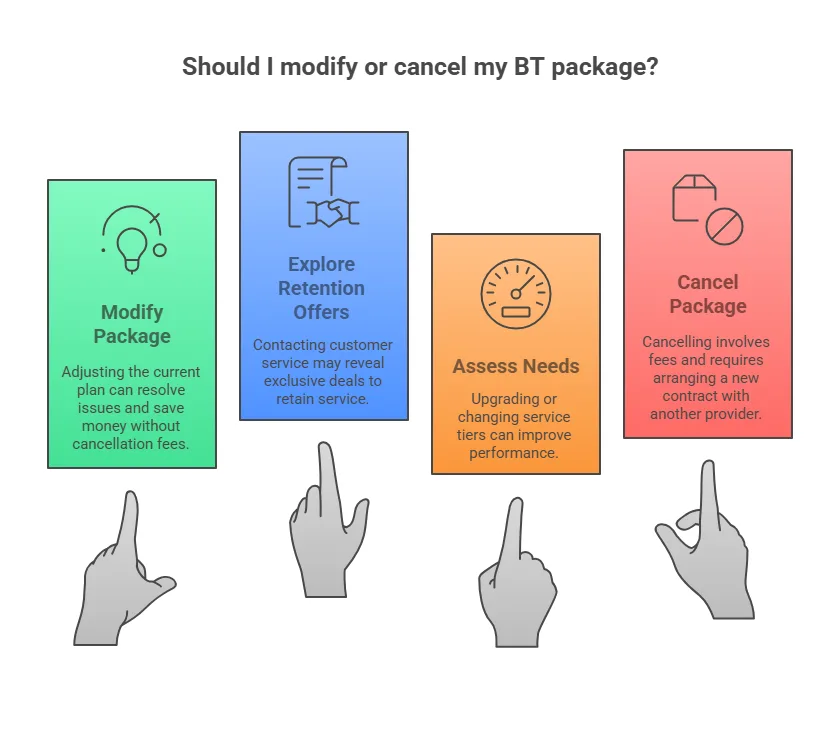
Review Your Contract: Log into your My BT account and look at your existing plan details. Sometimes switching to a broadband-only package or removing extra services like BT TV can save you money.
Explore Retention Offers: Contact BT’s customer service, ideally via the BT broadband cancellation number (0800 783 1401), and ask if there are exclusive retention deals available. BT sometimes offers discounts or upgrades to keep you as a customer.
Assess Your Needs: If you’re experiencing slow speeds or outages, BT might upgrade your service or offer a different package tier that better suits your current needs—even if you initially considered cancellation.
Making changes to your plan might be a smarter move than cancelling and then arranging a new contract with another provider.
Negotiating a Better Deal: Options Before Cancelling
Rather than cancelling outright, it might be worth trying to negotiate a better deal with BT. This approach can sometimes save you money without enduring the inconvenience of a complete switch. Here’s how:
- Identify Your Issues: Make a list of what isn’t working—whether it’s speed, reliability, or cost. Research competitive deals from other providers in your area to understand your options.
- Initiate a Conversation: When you contact BT via chat or over the phone, mention the competitive offers and express your concerns clearly. Ask if there are any retention offers or plan modifications available.
- Be Open to Alternative Options: BT might offer a temporary discount or upgrade your plan, resulting in better terms without facing the early termination fee. Negotiation can help bridge the gap between your current needs and the existing contract terms.
This strategy can often result in a win-win: you get an improved service while avoiding cancellation fees and the hassle of switching providers.
Cancelling BT Broadband due to a Bereavement
Experiencing the loss of a loved one is one of the most challenging moments in life, and dealing with administrative matters such as broadband accounts can add extra stress during this difficult time. BT understands these challenges and has set up a compassionate process to support you if an account holder has passed away.
When an account holder dies, you have the option to notify BT either through an online form or by phone (0800 169 1663) . To use the online form, you will need to supply essential details such as the account holder’s name, date of birth, and address, along with their account number or BT telephone number (whether mobile or landline).
It is helpful to have their latest bill at hand, as this may provide additional information that BT might require. Importantly, BT does not ask for the death certificate, which helps to simplify the process during an already distressing time.
Once BT is notified of the bereavement, you will be asked to advise what you want to do with the account. This might include transferring the account to another family member or closing it altogether.
By giving clear instructions on how to proceed, you help ensure that any unwanted charges are prevented and that the account is managed in a way that respects your needs during this period.
If you prefer to speak directly with a representative, you can contact BT’s bereavement helpline at 0800 169 1663. Their opening hours are 8am to 9pm Monday to Friday, 8am to 8pm on Saturdays, and 9am to 6pm on Sundays. This direct line offers support and guidance, ensuring that every step of the process is handled with sensitivity and understanding.
For further details on notifying BT of a bereavement and managing the account afterwards, please visit BT’s dedicated bereavement support page: Tell us an account holder has died | BT Help.
Returning Your BT Equipment
Properly returning BT equipment is a crucial step in the cancellation process. Failure to return equipment such as BT Hubs or TV boxes can result in extra charges on your final bill. Follow these guidelines for a smooth return.
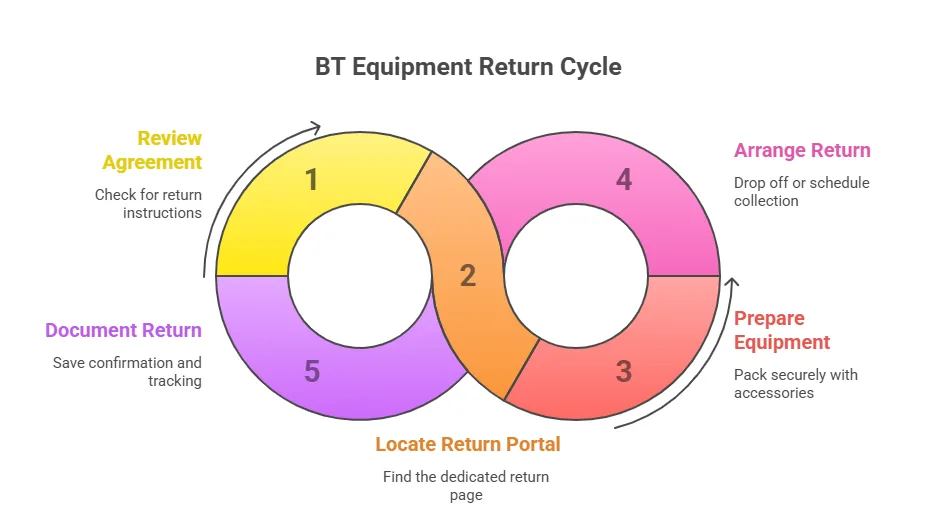
Review Your Agreement: Check your BT bill or online account for instructions on returning equipment. The details are usually provided in the “Return Equipment” section within your My BT account.
Locate the Return Portal: BT offers a dedicated page for returns and recycling procedures. For instance, see How to return and recycle your BT equipment for free for step-by-step instructions.
Prepare and Pack Your Equipment: Ensure that your BT Hub, TV box, and any accompanying cables or accessories are securely packed. Follow BT’s guidelines for protecting the equipment during transit.
Arrange a Return: Depending on your location, you may need to either drop off the equipment at a local Post Office or schedule a Royal Mail collection. BT will usually provide a returns bag and label—keep your proof of postage until confirmation is received.
Document Your Return: Always save any confirmation emails or tracking numbers. These records can help resolve any disputes or charges later on.
For further details, refer to the above link on how to return equipment. This ensures you’re protected from additional charges.
Retaining Your BT Email Addresses After Cancellation
A common concern for BT broadband users is what happens to their BT email addresses—such as btinternet, btopenworld, or talk21—once they cancel their broadband service. According to BT’s official support page, here’s what you need to know:
- Your Options: When you cancel your BT Broadband, you can:
- Close Your BT Email: Choosing this option means that your BT email account will be closed. However, if you close your email, on your broadband end date you will have a 60-day period during which you can decide to upgrade to Premium email. Failing to act within 60 days will result in the deletion of your email address and all associated personal data, making recovery impossible.
- Keep Your Email with Basic Email: If you take no action, BT will transfer your BT email to Basic email automatically. This is a free service that retains more limited features and can only be accessed via webmail.
- Retain Your Email with Premium Email: To maintain full functionality—similar to the features you enjoyed while on broadband—upgrade to Premium email at a cost of £7.50 per month. Premium email keeps all the features intact, and you can upgrade within the 60-day window after your broadband service ends.
- Linking to Another BT Broadband Account: If you have a friend or family member with an active BT Broadband service, you might be able to keep using your email by linking it to their account.
- Important Timing Considerations: After your broadband service ends, you have a 60-day grace period during which you can upgrade your email service to Premium email. If you do nothing, your account will default to Basic email, which has restricted functionality. Eventually, if you don’t upgrade or take action, BT will permanently delete the email addresses linked to your BT ID.
For more detailed information, please refer to BT’s official support page: What happens to my email address when my BT Broadband service stops?
Troubleshooting and Escalation During Cancellation
Even if you follow every step correctly, sometimes errors or delays occur. Here’s what to do if your cancellation process isn’t going as planned.
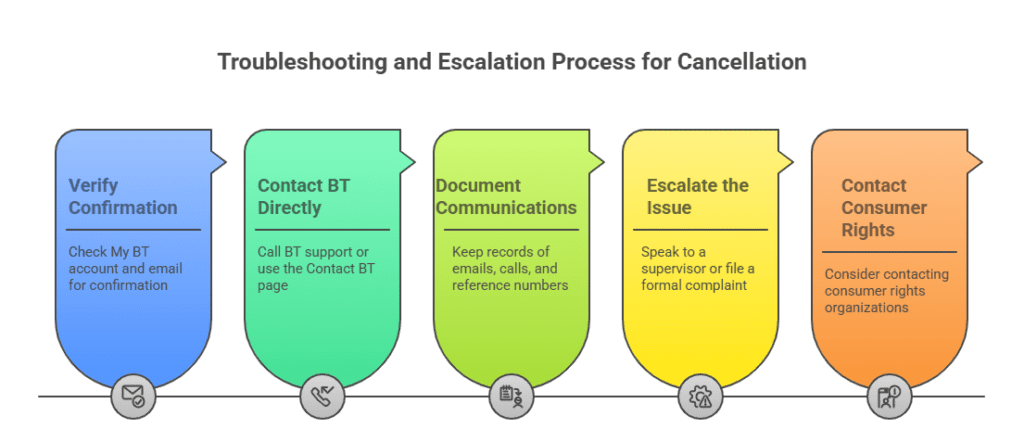
- Verify Your Confirmation: Check your My BT account and your email (including your spam folder) for a cancellation confirmation. If it hasn’t arrived within the expected timeframe, it might not have processed.
- Contact BT Directly: If you experience issues, call the BT support line at 0800 783 1401 or use the Contact BT page to reach a customer service representative. Have your account details and any reference numbers handy.
- Document Your Communications: Keep a record of all emails, call details, and reference numbers. This documentation will be useful if you need to escalate the issue.
- Escalate the Issue: If the problem persists, ask to speak to a supervisor or file a formal complaint through the BT website. You might also consider contacting consumer rights organizations if satisfactory resolution isn’t reached.
Following these steps helps ensure that any problems with your cancellation are sorted quickly.
Understanding Your BT Contract: Hidden Clauses and Key Points
Before taking any action, it’s essential to understand the fine print in your BT contract. Key points to keep in mind include:
Contract Duration: Confirm your minimum contract period and note any critical dates. Cancelling before the contract expires usually triggers an early termination fee.
Fee Calculation Details: Review the exact formula for calculating the cancellation fee, including VAT removal, cost savings, and the early payment discount. This knowledge empowers you to ask informed questions if discrepancies arise.
Equipment Return Obligations: Ensure you understand the clauses concerning the return of equipment. If you joined BT after December 2019, there are strict rules and deadlines to follow—the details are available in your account and on BT’s support pages.
Retention Clauses: Some contracts contain special offers or retention clauses that might reduce your fees if you decide to renegotiate. Knowing these details can provide leverage during negotiations.
Moving Home with BT: What You Need to Know
Moving house doesn’t have to mean losing your BT services. BT has a streamlined process designed to help you transfer your broadband, phone, and TV to your new address with minimal fuss. Here’s everything you need to know:
1. Give Adequate Notice
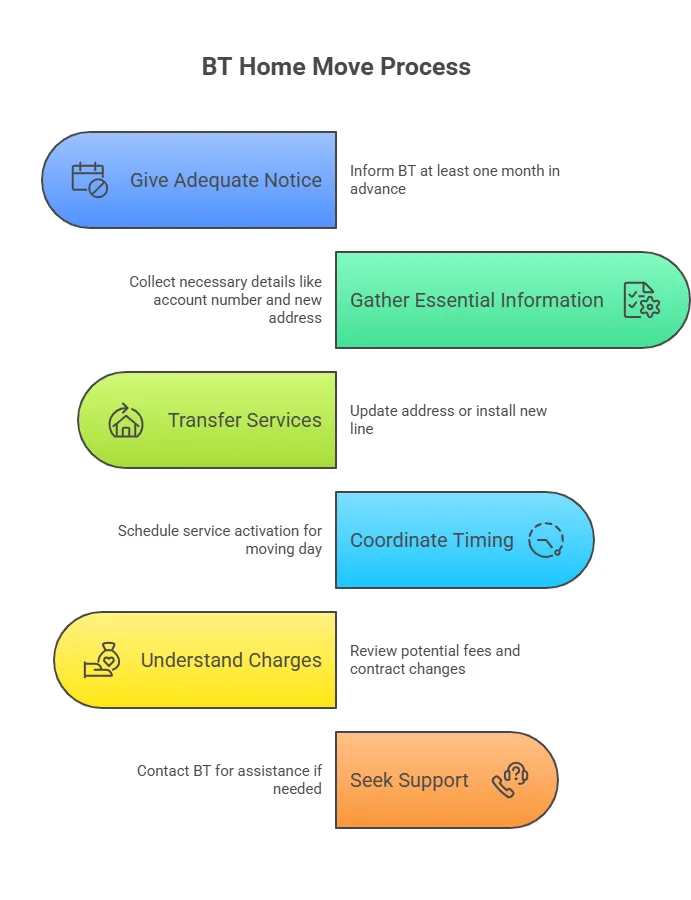
To ensure your services are ready when you move, BT advises giving at least one month’s notice. This extra time lets BT verify service availability at your new address and schedule any necessary connection work in advance.
2. Gather Essential Information
Before starting the home move process, have these details ready:
- BT Account Number: Locate it on your BT bill or by logging into your My BT account.
- Current Telephone Number: Needed to verify your account details.
- New Address: Provide your complete new address.
- Moving Date: Specify when you expect to move so BT can coordinate service activation.
- Phone Line Considerations: If you plan to retain your telephone service, note that if a new BT line is required at your new address, a new 12‑month contract term may be necessary.
3. Transferring Your Services
- Existing Connection: If your new home already has an active BT line, your current service can typically be transferred with no extra charges. Simply update your address via your My BT account.
- New Connection Fees: If your new address does not have a BT line, a connection fee may be applied. For example, if you have a landline-only package, you might face a fee of around £70 for copper-based broadband, or potentially higher if additional installation work is required.
- Equipment Transfer: Remember to take your existing BT equipment (e.g., BT Smart Hub) with you if you’re transferring your service.
4. Timing, Coordination, and Upgrading Options
- Service Activation: BT aims to have your services active on your moving day. However, if a new line installation is required, this process can take up to 15 working days.
- Upgrading Your Package: If you choose to upgrade your broadband during the move, this typically starts a new contract. It’s important to consider any activation charges or connection fees associated with a new contract.
- One-Touch Switch: Some new providers offer a “One-Touch Switch” service, which can simplify the transition—be sure to coordinate dates to avoid gaps or double billing.
5. Charges and Contracts: What to Expect
Understanding the potential changes in fees and contractual terms when moving home with BT is critical:
- Broadband Contract Transfer:
- If you’re happy with your current BT Broadband deal, transferring your service generally means you continue on your existing contract without extra charges.
- Note: If your broadband contract has less than three months remaining at the time of your move, BT may require a new three‑month minimum contract at your new address.
- Telephone Service Contracts:
- For BT telephone services, if you want to keep your phone line, a new 12‑month contract term for the telephone line will always apply at your new address.
- Any unused portion of your previous telephone plan (such as Line Rental Saver) or remaining contractual term on your calling plan typically transfers over, but a fresh contract commitment is normal for a new line installation.
- New Connection Fees:
- If your new address does not already have an active BT line, you might incur a connection fee. For instance, with a landline-only package, this fee could be around £70 (for traditional copper broadband) or differ based on your specific service.
- BT will clearly communicate any such charges during the home move process before any work is undertaken.
- Upgrading Options and New Agreements:
- If you decide to upgrade or change your package as part of the move, the process will generally involve taking out a new contract. This means new terms and potential activation fees, so it’s essential to compare these costs with the benefits of remaining on your current plan.
For detailed and up-to-date information regarding charges and contract adjustments when moving home with BT, please visit the official BT home move pages:
6. Support and Assistance
If you have questions or need help during your move:
- Helpline: Contact BT’s home move team directly on 0800 783 0235.
- Online Resources: Use the BT Contact page or download BT’s home move checklist to stay organised and ensure that all details are correctly managed.
If you’re moving home, why not use our broadband comparison tool to verify which providers offer the best coverage at your new address?
BT Broadband Cancellation Conclusion
Cancelling your BT Broadband online need not be complicated if you know the steps and potential fees involved. We’ve covered the entire process—from logging into your My BT account, understanding the cancellation fee (with a detailed calculation example), and exploring alternatives such as modifying your current package, to troubleshooting issues and ensuring proper equipment returns.
Remember to review your contract details carefully and use official support channels (such as BT Broadband Help and Contact BT) if you have any questions or issues. Now that you’re fully informed, it’s time to take control of your broadband service—whether that means switching providers, negotiating a better deal, or making a simple modification.
Take action today: compare new broadband options, evaluate your current package, or contact BT directly to explore your best possible solution
BT Broadband Cancellation FAQs
Can I cancel BT Broadband online?
Yes - you can log into your My BT account and submit a cancellation request, ensuring you provide the required 30-day notice.
How do I log into my My BT account
Simply visit bt.com/mybt and enter your registered credentials to access your account and manage your services.
What is the required notice period for cancelling BT Broadband?
BT requires you to give a minimum of 30 days’ notice before your cancellation becomes effective.
How is the BT broadband cancellation fee calculated?
The fee is based on the remaining monthly payments of your contract. First, the fee is calculated by multiplying the monthly cost by the number of remaining months, then VAT is removed, BT’s cost savings are subtracted, a 1% discount is applied for early payment, and finally, VAT is added back.
Can you provide an example of how the BT cancellation fee is worked out?
For instance, with a monthly charge of £35 and 4 months remaining, the total is £140. Removing VAT gives approximately £116.67; subtracting a saving of about £60 leaves £56.67; applying a 1% discount reduces it to around £56.10; finally, adding VAT brings the fee to roughly £67.32.
Will I be charged a cancellation fee if my contract has expired?
No - if you cancel once your contract has ended, you won’t incur an early termination fee.
What is the BT broadband cancellation number?
You can call BT on 0800 783 1401 to cancel your broadband service by phone.
What are BT’s customer service hours for cancellation?
Their support is available Monday to Friday (8am - 9pm), Saturday (8am -8pm), and Sunday (9am-6pm).
Can I cancel my BT Broadband contract by email?
Yes - you can send an email to digital-resolutionteam@bt.com with your account details and cancellation notice as an alternative to using the My BT account or phone.
What information should I include when cancelling by email?
Be sure to include the account holder’s full name, account number or BT telephone number, address, and your desired cancellation date along with confirmation that you’re giving the required 30-day notice.
What happens if I switch providers while still under contract?
If you switch before your contract ends, you may have to pay the calculated early termination fee. Many new providers offer a “One-Touch Switch” service to manage the cancellation for you.
Can I modify my BT package instead of cancelling entirely?
Yes - if you’re unhappy with your current plan, you might be able to switch to a different package or add extra features without incurring cancellation fees.
How do I return my BT equipment after cancelling my service?
Follow BT’s equipment return guidelines by logging into your account, accessing the returns section, and carefully packing and sending back your BT Hub and any accessories to avoid further charges.
How long does it take for my cancellation to be processed?
After submission, your service will remain active for 30 days - during which you’ll receive a cancellation confirmation via email or through your My BT account.
How can I negotiate a better deal with BT before cancelling?
Contact BT customer service and mention competitive offers from other providers. They may offer retention deals or package modifications to better suit your needs.
Will switching providers impact my cancellation fee?
The early termination fee still applies if you cancel before your contract is up. However, many new providers offer to manage the switch, which might include assistance with fee negotiation.
What should I do if I have service issues that are prompting my cancellation?
Before cancelling, report any service faults to BT. They may resolve your problems quickly, potentially saving you from early termination fees.
What happens to my BT email address when I cancel my broadband service?
When you cancel, you have several email options: your BT email can be closed, downgraded to a basic service, or upgraded to Premium email (at £7.50 per month) within 60 days of cancellation.
Can I keep my BT email address after cancelling my broadband?
Yes - you can either choose to transfer your BT email to Basic email for free or opt for Premium email to retain all features. There is a 60-day window after which the account may be deleted if no action is taken.
What connection fees might apply when moving home with BT?
If your new address does not have an existing BT line, you may incur a connection fee, which can be around £70 for copper broadband or more for a full installation.
Will my BT contract transfer automatically when I move home?
Generally, if your new home already has a BT connection, your services and contract can be transferred without extra charges. New connection fees may apply if a new line is required.
How long does it take to activate BT services at a new address?
If a new connection is needed, the installation process can take up to 15 working days, so plan your move accordingly.
What steps should I take when moving home with BT?
Provide at least one month’s notice, update your address in your My BT account, check service availability at your new location, and review any potential changes in fees or contract terms.
Can I cancel BT Broadband in the event of bereavement?
Yes - BT offers a bereavement cancellation process. You can notify them online or by phone, and you don’t need to submit a death certificate to proceed.
What information do I need for cancelling in a bereavement situation?
You will need to provide the account holder’s name, date of birth, address, and relevant account details. Then, state whether you wish to close the account or transfer it to another family member.
How can I compare broadband options before deciding to cancel?
Before cancelling, use our broadband coverage checker to compare available services in your area. This tool reviews speeds, prices, and customer reviews to help you decide whether switching or upgrading your existing plan might be more beneficial than cancelling outright.